
From Hour of Code to Hour of AI
If you’ve been following the world of computer science education, you’ve likely heard of Code.org’s Hour of Code—the global movement that has introduced millions of students to programming through fun, one-hour activities. Well, there’s exciting news: The Hour of Code is now the Hour of AI.
This evolution reflects the growing importance of AI literacy in our increasingly automated world. Code.org has reimagined their flagship program to help students understand not just how to code, but how to work with and understand artificial intelligence.

From Matrix Dreams to Modern Reality
Picture this: You’re watching a classic hacker movie, mesmerized by those green-on-black terminal screens, rapid-fire typing, and that satisfying click-click-click of commands executing. Fast forward to 2025, and I thought: “Why can’t cybersecurity education look this cool?”
That’s exactly how cybersec.raze.mx was born - a cybersecurity educational platform that brings the Hollywood hacker aesthetic to real-world security education. But instead of using outdated terminal emulators, I built it with modern web technologies that would make any frontend developer proud.

The Art of Speaking Machine: My Journey into Prompt Engineering
Six months ago, I thought prompt engineering was just a fancy term for “writing better Google searches.” Boy, was I wrong. After diving deep into GitHub Copilot and experimenting with various AI coding assistants, I’ve discovered that prompt engineering is more like learning a new programming language—one where precision, context, and creativity intersect in fascinating ways.
In this post, I’m going to share the techniques and experiments that have transformed my relationship with AI-assisted coding. We’ll explore the fundamentals of constructing effective prompts, dive into the powerful 4S technique, and master the spectrum of zero-shot, one-shot, and few-shot learning approaches that can turn you from a hesitant AI user into a confident code whisperer.

All Aboard the AI Express
Picture this: You’re standing on a train platform, staring at a massive, rusted locomotive that’s been sitting idle for years. The engine is your legacy codebase—full of promise but plagued with mysterious errors, outdated dependencies, and that one function everyone’s afraid to touch because “it just works.” Then GitHub Copilot walks up, tips its conductor’s hat, and says, “Mind if I take the wheel?”
That’s exactly how my journey with GitHub Copilot began six months ago. What started as curiosity about AI-assisted coding has evolved into a fundamental shift in how I approach software development. But here’s the thing—watching Copilot work is like being a passenger on a high-speed train, observing the landscape blur by while occasionally wondering, “How does it know to take that exact route?”
Hello reader, Jorge here. In this post I will be showing you how to deploy an Azure Kubernetes cluster with Terraform. I will be using the following technology stack so you better be prepared with the tools installed and working properly:
Terraform is an awesome open source tool that helps developers automate the provisioning of cloud infrastructure and objects, such as virtual machines, storage, networks, and more. It is a tool that allows you to define your infrastructure as code and deploy it to the cloud provider of your choice
Hello reader, Jorge here. I’ll be starting a series of articles about Kubernetes since I’m studying for the CKAD exam.
In this post I will be talking about the components that make up a Kubernetes cluster. I will be using the following diagram to explain the building blocks:
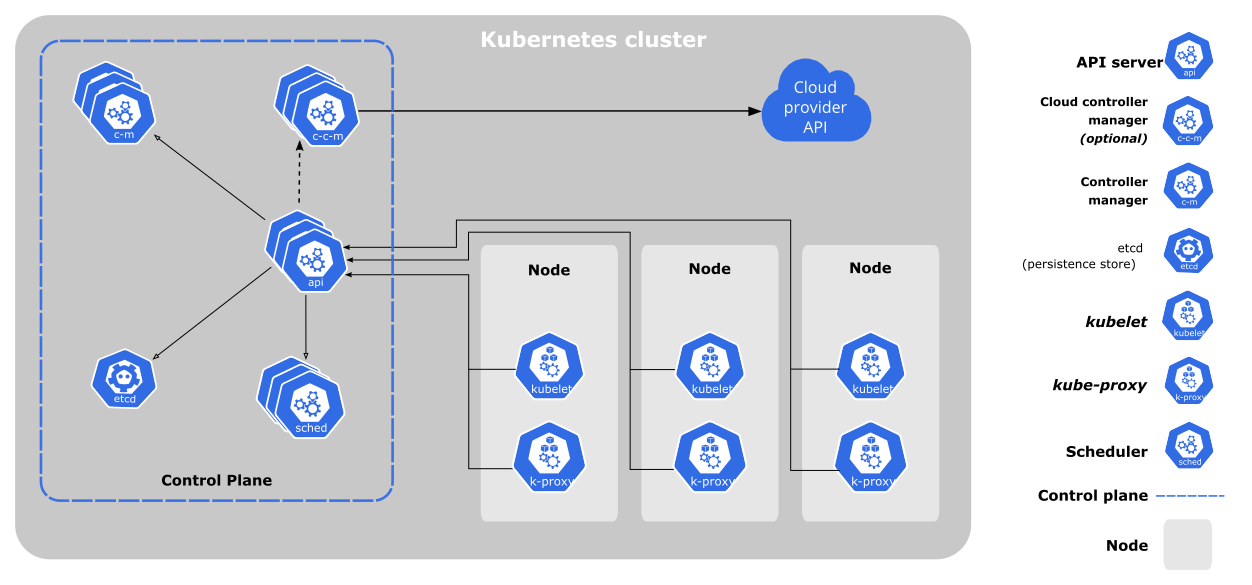
The diagram above shows the components that make up a Kubernetes cluster. The components are divided into two groups:
- The control plane: Manages the worker nodes and the Pods in the cluster. Additionally, it makes components make global decisions about the cluster (for example, scheduling), as well as detecting and responding to cluster events (for example, starting up a new pod when a deployment’s
replicasfield is unsatisfied). - The worker nodes: The actual machines running your contasinerized applications (for example, Pods). The worker nodes may be VMs or physical machines, depending on your cluster. Each node has the services necessary to run Pods and is managed by the control plane.
As we see on the previous diagram, we can see that the control plane is made up of the following components:
Hello people, this time I’ll use this blog post a a placeholder for a snippet that is useful when working with My SQL and specially if you’re having trouble understanding behaviours on your database.
Enable Query Log Mysql
There are a couple of options when you want to enable query log on your database, the first one is to use the following configuration:
For MySQL 5.1.28 and older, edit the /etc/my.cnf file and in the [mysqld] section add the following line:

Hello again dear reader!
I was a little bit concerned about not writing so much this 2022, but the pandemy has relaxed and now the real world is taking my whole energy.
So instead of giving you my words, this time I’ll give you a more visual content.
To give a little bit of context Dall-E and Dall-E 2 are machine learning models developed by OpenAI. Those are state-of-the-art machine artificial intelligence models, that basically means that some nerdy guys took a lot of data, used some crazy math on it and then resulted on a couple of models cappable of generating images based on a provided description.

Hello dear reader, this time I don’t have much words, but instead I want to share some code I haven’t shared for a long.
A few years ago, I had a work pause and got some time to make some courses, checking priorities and decision making.
On 2015 after getting a last paycheck for a project, I found this great Kadenze platform and this great course from the Processing foundation.
The visualizations can be found hosted here and the code here.

Hello random reader that’s browsing this content, if this is the first time you’re here, then you probably reached this site by google searching or you’re probably a technical recruiter or someone that clicked on my website’s link, any kind of reader you’re, THANK YOU VERY MUCH FOR BEING HERE, please get comfortable.
Today I’d like to write some thoughts that I’ve been having around the technical recruiting processes and of course specifically around IT roles, if you’ve read my previous posts, you migh be thinking that this is only salt, but if you read carefully you’d realize that I like to point things that are normalized of that have become the rule for no reason, so let’s go ahead and deep dive.